
Why faster broadband won't make one device faster (and why speed tests mislead)
Think motorway lanes, not speed limits
Your broadband package is like a motorway. Upgrading from 80Mbps to 500Mbps doesn't raise the speed limit for each car: it adds more lanes. One car on an empty road goes no faster with six lanes than with two. But at rush hour, when everyone's on the road, the extra lanes are the difference between flowing traffic and a jam.
In your home the "cars" are TVs, laptops, phones, consoles, tablets, doorbells and smart speakers. The average UK home now has well over a dozen connected devices, and in the evening many of them are busy at the same time.
What 8pm actually looks like
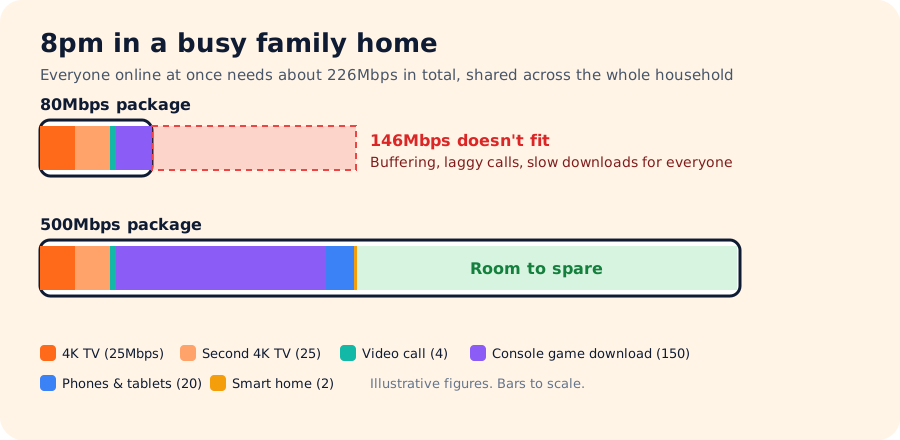
None of those devices needs 500Mbps by itself. The 4K TV only wants about 25Mbps. But add them together and the household needs far more than any single device does. That combined demand is what you're really paying for when you upgrade.
Every device has its own ceiling
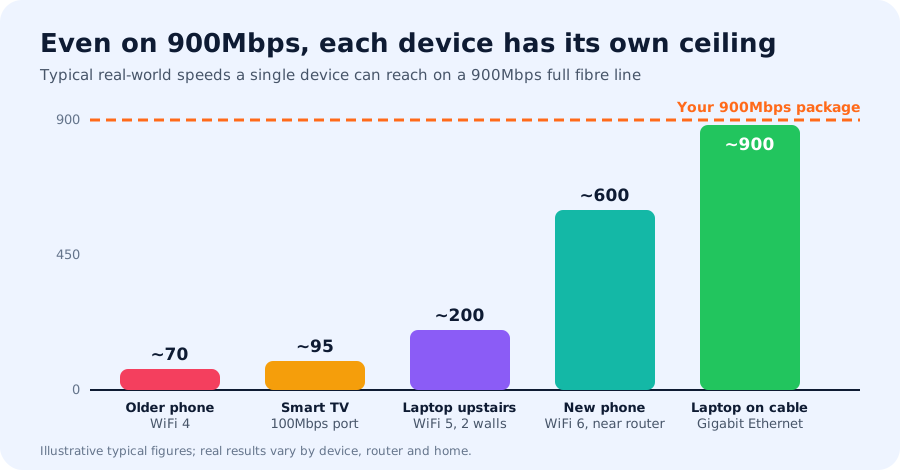
- WiFi standard: an older phone or laptop with WiFi 4 or WiFi 5 may top out at 50–300Mbps, however fast your line is.
- Ports: many smart TVs and some older laptops have 100Mbps network ports, so they can never go above about 95Mbps on a cable.
- Distance and walls: WiFi speed drops with every wall, floor and metre from the router. Stone walls, foil-backed plasterboard and mirrors are the worst.
- The device itself: battery-saving modes, a busy processor or dozens of browser tabs all slow a test down.
Why a speed test isn't a fair check on your package
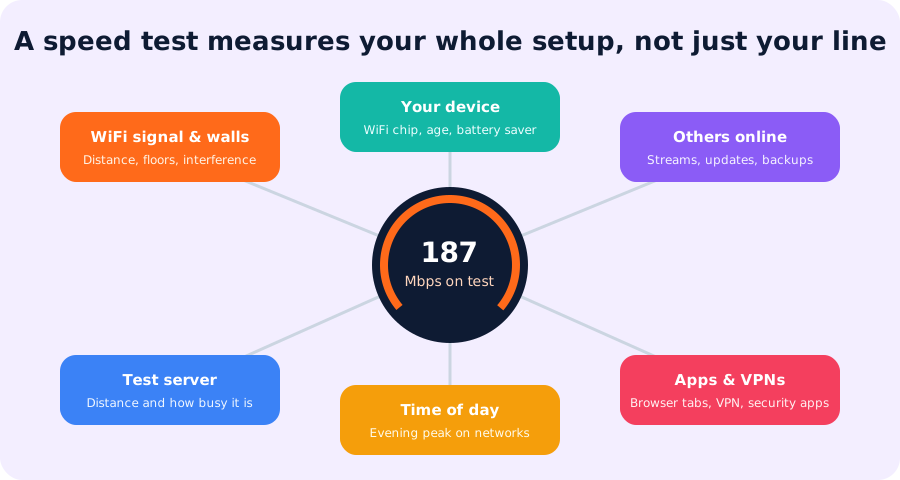
When you run a speed test on your phone from the sofa, you're measuring the whole chain: your phone's WiFi chip, the walls between you and the router, whatever else the household is doing, and a test server that might be busy or far away. If your phone reports 187Mbps on a 900Mbps package, it usually means your phone or your WiFi is the limit, not the line.
That's why "I pay for 900Mbps but my speed test says 200" rarely means you're being short-changed. Your package is still delivering 900Mbps of capacity to the house; one device just can't use all of it.
How to test your broadband properly
- Use a cable. Plug a modern laptop into the router with an Ethernet cable (gigabit or better).
- Pause everything else. Stop streams, downloads, game updates and cloud backups, or test when the house is quiet.
- Close apps and switch off your VPN.
- Test a few times at different times of day, and use your provider's own speed checker as well as a general one.
- Restart the router if results are consistently low, then test again.
- Compare with your minimum guaranteed speed, not the headline package speed.
So what should you pay for?
Cooper asks how many devices you have and how you use them, then recommends a package that fits your whole home, not just your fastest gadget. See also what broadband speed do I need? and 12 ways to speed up your WiFi.
Let Cooper find your match
Answer a few quick questions and see the deals that reach your address.
Frequently asked questions
Will faster broadband make my phone faster?
Only up to a point. Your phone has its own ceiling set by its WiFi chip and your signal. A faster package mainly means your phone doesn't slow down when everyone else is online too.
Why does my speed test show less than I pay for?
Usually because you are testing over WiFi, on a device that can't reach the full speed, or while others are using the line. Test on a cable with nothing else running to see your real line speed.
Are speed tests accurate?
They accurately measure what one device gets at that moment, which depends on your WiFi, device, other users and the test server. They aren't a reliable measure of your whole package unless you test wired with nothing else running.
Is it worth upgrading if one device is slow?
Not if that device is the bottleneck. Fix WiFi coverage or the device first. Upgrade your package when several people or devices compete for the line at busy times.
What speed am I guaranteed?
Providers that follow Ofcom's broadband speeds code must tell you a minimum guaranteed speed at sign-up. If your speed falls below it and they can't fix it, you can usually leave without penalty.